
Technology
- Home
- Technology
- News
Microsoft Office can now be controlled with Logitech’s MX Creative Console
Logitech has announced a new suite of Productivity Plugins for its entire MX line of accessories, including its Stream Deck alternative, the MX Creative Console. Since the console launched in September 2024, Logitech has been expanding its capabilities with p…

Published 5 months ago on May 2nd 2026, 2:00 pm
By Web Desk
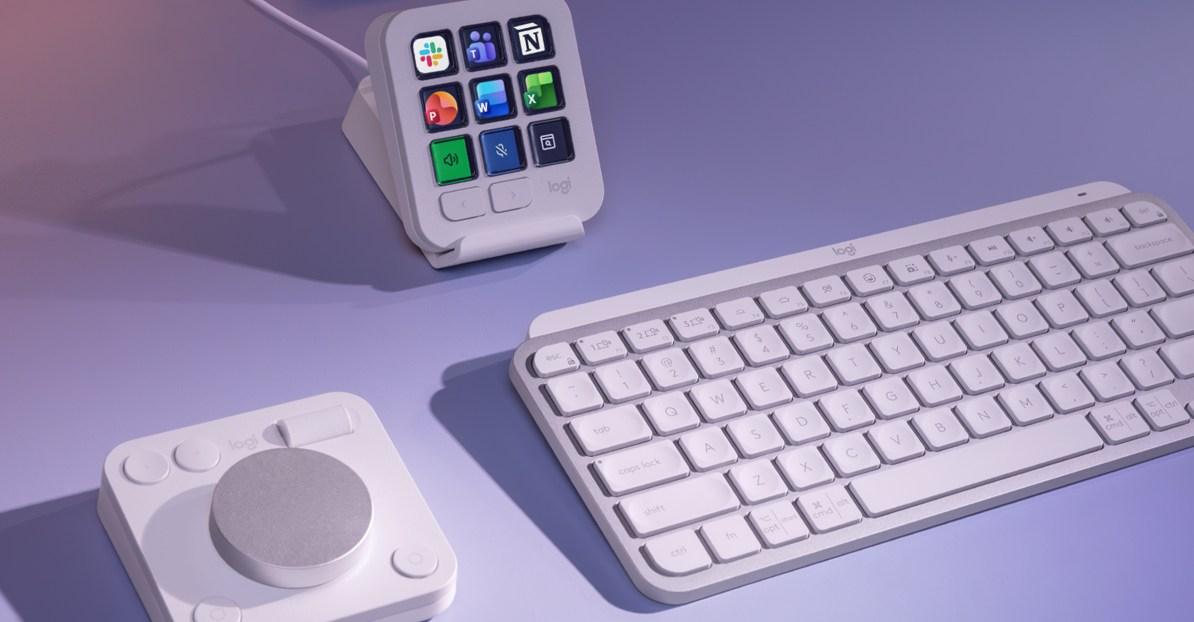
Logitech has announced a new suite of Productivity Plugins for its entire MX line of accessories, including its Stream Deck alternative, the MX Creative Console. Since the console launched in September 2024, Logitech has been expanding its capabilities with plug-ins that support creativity-focused apps such as Final Cut Pro, Adobe Lightroom, and Figma. That is now expanding to include productivity apps, such as Microsoft Office’s Word, Excel, and PowerPoint, as well as Slack and Notion.
Shortcuts, actions, and specific tools in those apps can be quickly accessed using Logitech’s Actions Ring menus, which are supported by accessories like the MX Master 4 mouse and the MX Mechanical Mini keyboard. The Action Rings are available through the Logi Options Plus app, which is also used to customize and personalize the functionality of various Logitech accessories.
[Image: You can create custom buttons to control many features of Word, Excel, PowerPoint, Slack, and Notion through the MX Creative Console. https://platform.theverge.com/wp-content/uploads/sites/2/2026/04/logitech_plugins2.jpg?quality=90&strip=all]
With the MX Creative Console, you can create dedicated buttons for common functions across the newly supported apps, such as replacing text in Word, inserting cells in Excel, switching Slack workspaces, or formatting to-do lists in Notion. The new Productivity Plugins are now available for free through the Logi Marketplace.
[Media: https://www.youtube.com/watch?v=i7iajg9JnoY]
Alongside the new plug-ins, Logitech also announced improvements to its Easy Switch feature, allowing accessories such as mice and keyboards to connect to and switch between multiple computers. Instead of having to press the Easy Switch button on every device you want to switch, the Logi Options Plus app can be configured so that pressing the button on the MX Keys S or MX Keys Mini keyboards automatically switches an MX mouse and the MX Creative Dialpad, too. One press of the button can move up to three devices. Logitech says a firmware update will be needed for the accessories you want to use with this feature, and it plans to expand support to additional keyboards in the MX line in the future.

Is this the cure for Alzheimer’s?
- 17 گھنٹے قبل

PM Shehbaz calls for comprehensive strategy to combat diabetes
- 8 گھنٹے قبل

Xbox is launching a new film and TV division
- 19 گھنٹے قبل

Saudi-led coalition says destroyed more than 100 Houthi targets
- 8 گھنٹے قبل

President Zardari and PM Shehbaz 'agree' on imposition of emergency in KP: sources
- 2 گھنٹے قبل

What if making your neighborhood safer means breaking the rules?
- 17 گھنٹے قبل

World economic growth to slow to 2.6pc in 2026, UN trade body says
- ایک دن قبل

Anthropic bans ‘abusive or cruel behavior’ towards Claude
- 19 گھنٹے قبل

Pilot among three Saudi nationals killed in attacks on Riyadh airport, authorities say
- ایک دن قبل

Pakistan calls for immediate de-escalation of Ukraine conflict
- 6 گھنٹے قبل

Pakistan committed to peaceful outcome of Iran-US conflict: DG ISPR
- ایک دن قبل

No one wants to be “Data Center Dave”
- 17 گھنٹے قبل
You May Like




Trending