Technology
- Home
- Technology
- News
Apple adds a new toggle to make Liquid Glass less glassy
Apple’s latest iOS 26.1 beta has a new option that lets you tint Liquid Glass elements of iOS 26 so that they are more opaque. Since announcing Liquid Glass at WWDC this year, Apple has tweaked exactly how glassy Liquid Glass is — early on, there were some le…

Published a year ago on Oct 24th 2025, 5:00 am
By Web Desk
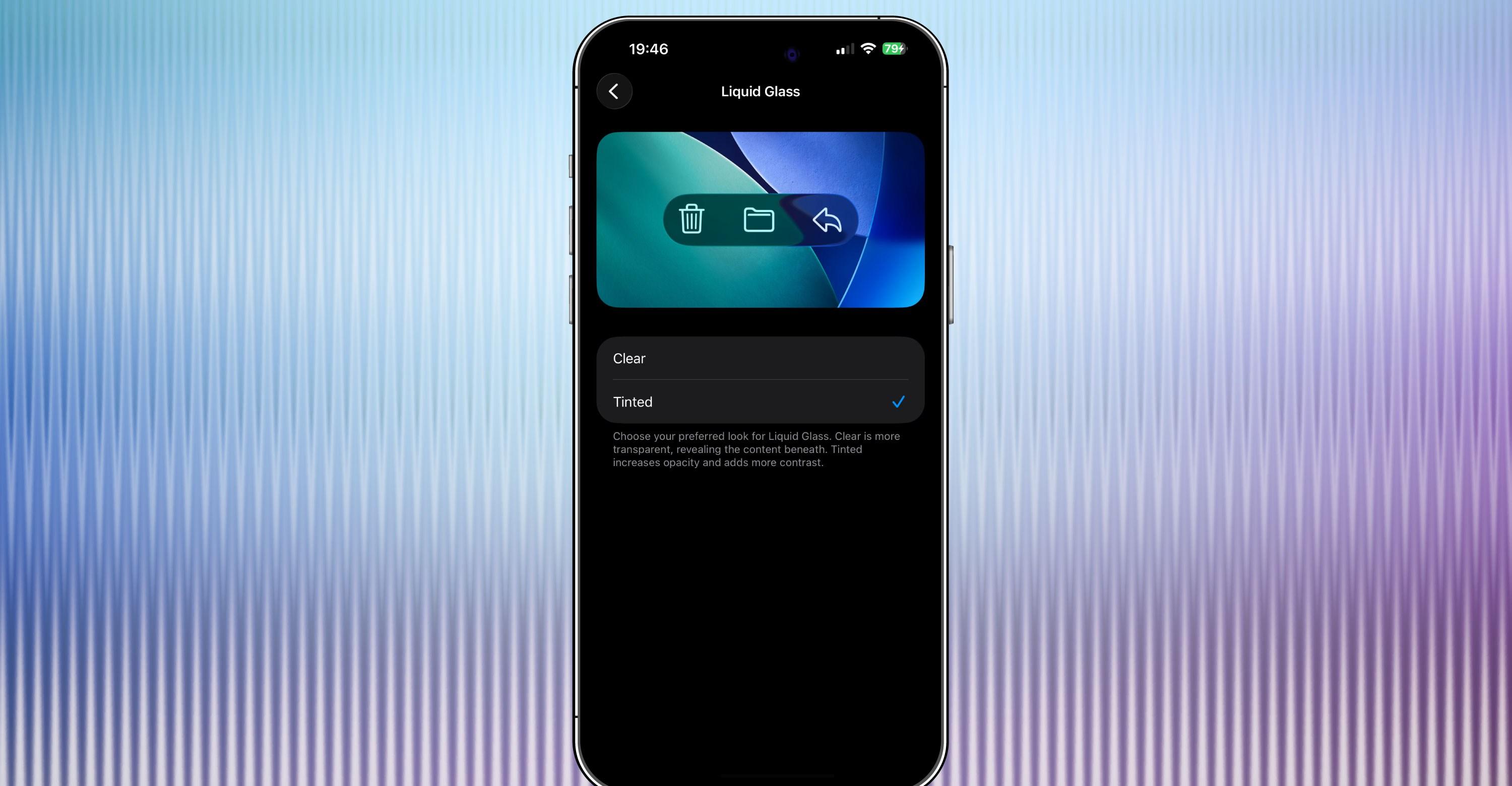
Apple’s latest iOS 26.1 beta has a new option that lets you tint Liquid Glass elements of iOS 26 so that they are more opaque. Since announcing Liquid Glass at WWDC this year, Apple has tweaked exactly how glassy Liquid Glass is — early on, there were some legibility issues — but this new setting gives you the choice of making things more transparent or more frosted.
The option is available now in the iOS 26.1 developer beta that Apple launched on Monday. You can access it from Settings > Display & Brightness > Liquid Glass, where you can choose between “Clear” and “Tinted.” The latest iPadOS 26.1 and macOS 26.1 developer betas also let you tint Liquid Glass, MacRumors reports.
Here’s a few image sliders showing how things look with the clear or tinted Liquid Glass. For each one, the screenshot on the left features the app with the “Clear” Liquid Glass option while the screenshot on the right uses the “Tinted” one. The differences are subtle, but I much prefer the Tinted versions.
[Image: https://platform.theverge.com/wp-content/uploads/sites/2/2025/10/IMG_0027.jpeg?quality=90&strip=all]
[Image: https://platform.theverge.com/wp-content/uploads/sites/2/2025/10/IMG_0028.jpeg?quality=90&strip=all]
The Liquid Glass menu in settings.
[Image: https://platform.theverge.com/wp-content/uploads/sites/2/2025/10/IMG_0029.jpeg?quality=90&strip=all]
[Image: https://platform.theverge.com/wp-content/uploads/sites/2/2025/10/IMG_0030.jpeg?quality=90&strip=all]
The Verge’s homepage.
[Image: https://platform.theverge.com/wp-content/uploads/sites/2/2025/10/IMG_0020.jpeg?quality=90&strip=all]
[Image: https://platform.theverge.com/wp-content/uploads/sites/2/2025/10/IMG_0021.jpeg?quality=90&strip=all]
[Image: https://platform.theverge.com/wp-content/uploads/sites/2/2025/10/IMG_0025.jpeg?quality=90&strip=all]
[Image: https://platform.theverge.com/wp-content/uploads/sites/2/2025/10/IMG_0026.jpeg?quality=90&strip=all]
The Apple TV app. Apple seems to still be rolling out the Apple TV rebranding.
[Image: https://platform.theverge.com/wp-content/uploads/sites/2/2025/10/IMG_0018.jpeg?quality=90&strip=all]
[Image: https://platform.theverge.com/wp-content/uploads/sites/2/2025/10/IMG_0019.jpeg?quality=90&strip=all]
The App Store.
The Liquid Glass toggle isn’t the only handy new option Apple added with the newest iOS 26.1 beta. The update also lets you turn off the ability to swipe to the camera from the lockscreen, which might prevent people who have your phone from taking pictures even if they can’t bypass your lockscreen. You can access the toggle from Settings > Camera > Lock Screen Swipe to Open Camera.

Disney Plus will stream Super Bowl LXI
- 15 hours ago

Pakistan calls for immediate de-escalation of Ukraine conflict
- a day ago

No one wants to be “Data Center Dave”
- 2 days ago

Anthropic bans ‘abusive or cruel behavior’ towards Claude
- 2 days ago

Who are the violent Israeli settlers in the West Bank?
- 13 hours ago

President Zardari and PM Shehbaz 'agree' on imposition of emergency in KP: sources
- a day ago
UPDATE: DITKA DEAD AT 86...
- 14 hours ago

Xbox is launching a new film and TV division
- 2 days ago
PM Shehbaz calls for comprehensive strategy to combat diabetes
- a day ago

Is this the cure for Alzheimer’s?
- 2 days ago

What if making your neighborhood safer means breaking the rules?
- 2 days ago

Saudi-led coalition says destroyed more than 100 Houthi targets
- a day ago
You May Like


Trending